What You're Actually Getting
You commented "SETUP". Here's the whole thing. No fluff, no upsell.
A repeatable system that takes one idea and turns it into a reel published on 5 channels. Claude Code does the thinking and writing. Blotato does the publishing and scheduling. You stay in the loop only where it matters: the idea, the hook, the final approval.
The Stack
That's it. No Zapier mess. No 14 tabs open.
Why Blotato (And Not Buffer, Later, Or Hootsuite)
I tried 4 publishers before I landed on Blotato. Here's the short version of why the others didn't make the cut.
| Tool | Why I dropped it | Verdict |
|---|---|---|
| Buffer | Solid UI but reel-specific features lag. Video upload limits hit fast. | Fine for text. Weak for video. |
| Later | Built for Instagram. Other platforms feel bolted on. No real API. | OK if you only post on IG. |
| Hootsuite | Enterprise pricing, enterprise UI. Overkill for one person. | Skip unless you're a team of 20. |
| Metricool | Decent analytics, but the publishing flow takes too many clicks per post. | Good for reporting. Slow for posting. |
| Blotato | Built for short-form video. Real API. Bulk publishing is one action. Caption variants per platform. | The one I use every week. |
The decisive factor: Blotato has a real API. That's what makes the Claude Code skill work. Without an API, you're back to copy-pasting captions into a browser, which kills the entire point of the system.
Part 1. Structure Your Input
The biggest mistake people make is asking AI for "a reel script" and getting garbage back. The output is only as good as the brief.
I give Claude three things every time
- The angle. Not the topic. The angle. "AI agents" is a topic. "Why most AI agents fail in week two" is an angle.
- The proof. A number, a screenshot, a client story, a personal failure. One concrete thing the viewer cannot dispute.
- The audience tension. What does my viewer secretly believe that I'm about to challenge?
The prompt template I paste into Claude Code
Write a 45 second reel script.

Angle: [one sentence]
Proof: [one concrete fact, number, or moment]
Tension: [the belief I'm pushing against]
Tone: direct, conversational, first person
Format: Hook, Body, CTA.
Use the loop technique on the CTA so it ties back to the hook.
That's the entire prompt. It works because Claude doesn't have to guess what I want.
Part 2. Claude Code Generates Scripts
I built a small Claude Code skill called reels-script. You don't need to copy mine exactly. The pattern is what matters.
What the skill does, in order
- Takes the brief from Part 1.
- Drafts the script using Hook / Body / CTA with the loop technique.
- Outputs a markdown file with YAML frontmatter (title, hook, platform tags).
- Saves it to
~/Documents/Arcgent/Content/Inbox/.
After that I record the reel. One take, phone on a tripod, no editing beyond captions.
The actual skill structure (copy this)
A Claude Code skill is one folder with a SKILL.md file. Here's the skeleton I use for reels-script:
~/.claude/skills/reels-script/
  └── SKILL.md
And the contents of SKILL.md:
---
name: reels-script
description: Write a 45 second Instagram Reel script using
  the Hook / Body / CTA framework with the loop technique.
  Use when the user wants a reel script.
---

# Reels Script Generator

When invoked, ask for:
- Angle (one sentence)
- Proof (one concrete fact, number, or moment)
- Tension (the belief the script challenges)

Then write a 45 second script with this structure:

## Hook (5-7 seconds)
- Under 9 words
- Use a number or a belief flip
- Never start with "In this video"

## Body (25-30 seconds)
- 3 short beats
- One example or proof point
- First person, conversational

## CTA (5-8 seconds)
- One specific ask
- Loop back to the hook in the final line

Output as markdown with YAML frontmatter:
title, hook, master_caption, platform_tags.
Save to ~/Documents/Arcgent/Content/Inbox/
The bulk-distribute-reels skill follows the same shape. It reads files from the Inbox, generates platform-specific captions, and posts to the Blotato API.
Recording Setup That Doesn't Suck
The number one question I get: "What gear do you use?" Here it is. Cheaper than you think.
Captions and edits
I use CapCut on the phone. Auto-captions, one quick pass to fix typos, export. Total edit time per reel: 4 minutes.
Part 3. Blotato Auto-Posts To 5 Channels
I have one "Reel Distribution" template in Blotato that includes all 5 accounts. Each account gets its own caption variant.
The trick: I don't write captions five times. I write one master caption, then a second Claude Code skill called bulk-distribute-reels adapts it per platform and pushes everything to Blotato through the API.
Part 4. Hooks That Stop The Scroll
Three patterns I rotate. Nothing else.
Pattern 1. Outcome plus time
- "100K views per week. 30 minutes of work."
- "5 clients in 3 weeks. Zero cold calls."
Pattern 2. Belief flip
- "Everyone tells you to post daily. That's the wrong advice."
- "AI won't take your job. Bad workflows will."
Pattern 3. Mistake confession
- "I burned 4 months building the wrong system."
- "I wasted 2K on tools I didn't need."
- First line must be under 9 words.
- Use a number whenever possible.
- Never start with "In this video" or "Today I want to talk about".
- Read it out loud. If it sounds like a podcast intro, kill it.
Part 5. Idea To Published Reel
Total time: 30 minutes once a week, batched.
Open Claude Code. Ask it to generate 7 angles based on what I've been working on. Pick 5.
Same shirt, same lighting, same energy. One take each. No re-records.
Move the video files into ~/Documents/Arcgent/Content/Inbox/.
Claude Code writes platform captions, uploads to Blotato, schedules across the week.
Content publishes itself for the next 5 days. No daily posting stress. No app-switching. No "what should I post today".
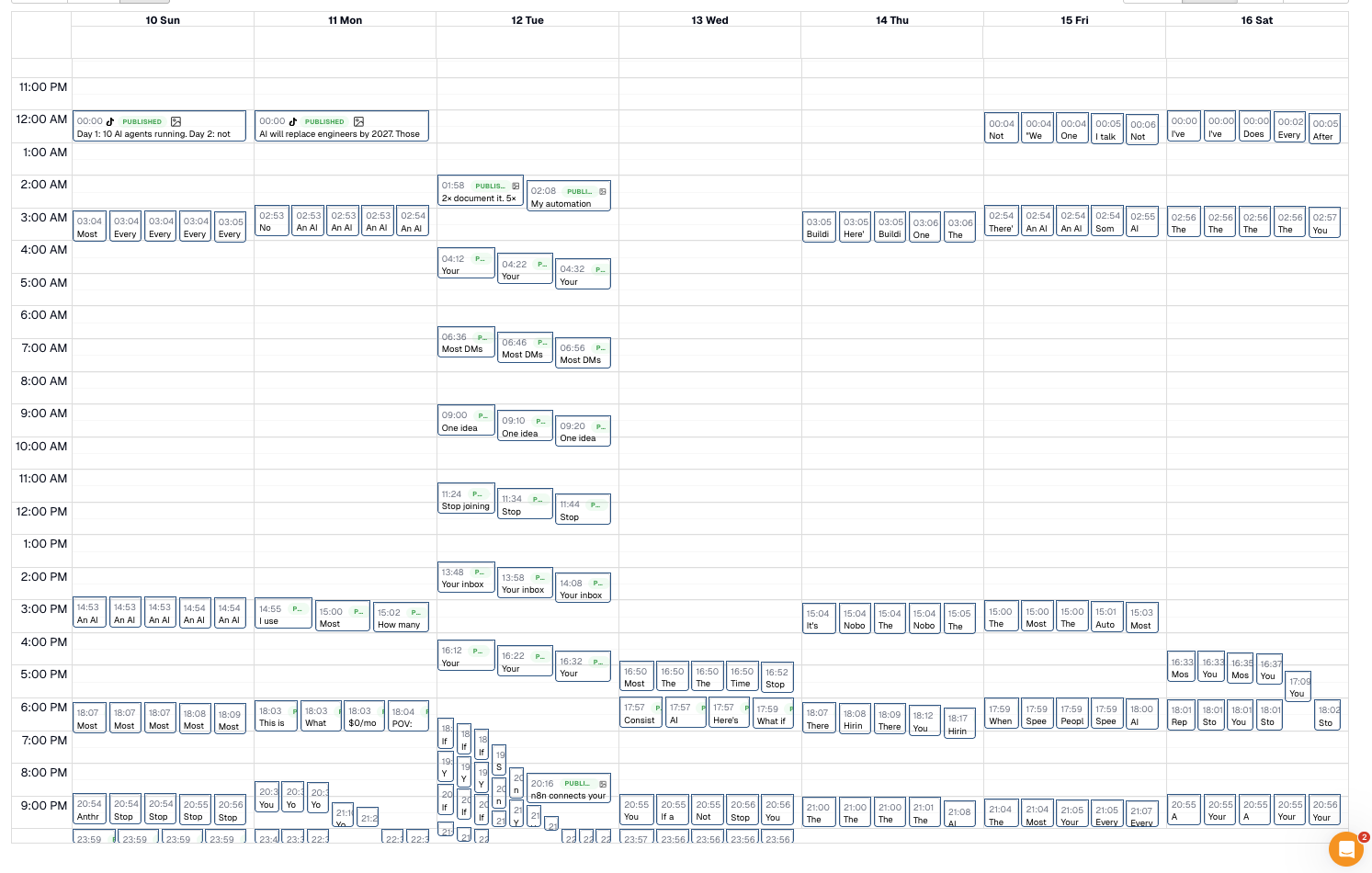
This is what my Blotato calendar actually looks like
Not a mockup. Not a demo. A screenshot of my scheduled posts, pulled from Blotato. Every green block is a reel queued to publish across multiple platforms automatically.
A Real Reel, End To End
One reel I posted last month, from brief to 5 platforms. Real numbers. Real captions.
Step 1. The brief I gave Claude
Angle: Most founders spend more time managing AI
  tools than getting value from them.
Proof: I tracked it for a month: 6 hours/week on
  tool admin, 2 hours/week on actual output.
Tension: People believe more tools = more leverage.
  Reality: more tools = more tool overhead.
Tone: direct, conversational, first person.
Step 2. The script Claude wrote
Hook: "6 hours a week on AI tool admin. 2 hours of actual output. That's the trap most founders are in."
Body: "I tracked it for a month. Logging in. Updating prompts. Switching tabs. Reading newsletters about new tools. Six hours, every week. Then I cut my stack from 11 tools to 4. Output doubled. Time on admin dropped to one hour."
CTA: "If you're managing AI more than using it, you don't need more tools. You need fewer. Comment STACK and I'll send you the 4 I kept."
Step 3. Platform captions Blotato published
6 hours a week on AI tools. 2 hours of actual output. Comment STACK for the 4 I kept. #AItools #productivity #founders
TikTok
Most founders are doing this wrong. Six hours a week on tool admin. Two hours on output. Here's how I fixed it 👇 #ai #founders #productivity #ailtools #saas #automation
I tracked my AI tool usage for a month.
6 hours per week on admin.
2 hours per week on actual output.
That's the founder trap nobody talks about.
More tools doesn't mean more leverage. It means more overhead.
I cut my stack from 11 tools to 4.
Output doubled. Admin dropped to 1 hour per week.
If you're managing AI more than using it, you don't need more tools. You need fewer.
Comment STACK and I'll send you the 4 I kept.
YouTube Shorts
Title: 6 Hours of AI Admin Per Week (The Founder Trap)
Description: Most founders are managing tools more than using them. Here's the 4 I kept after cutting 7. Comment STACK for the list.
6 hours a week on AI tools. 2 hours of actual output. I cut my stack from 11 to 4 and doubled my output. Comment STACK for the list.
Time spent: 6 minutes recording, 4 minutes editing captions, 2 minutes review. The rest happened automatically.
Part 6. Mistakes To Skip
The first weeks I made every one of these. You don't have to.
LinkedIn punished me with zero reach because I posted Instagram-style copy.
I used to write the body first and the hook second. The hook always felt bolted on.
I spent 3 weeks tweaking Blotato templates before posting anything. Useless.
First month: zero comments. Reason: I never asked for one.
I burned out trying to manage 5 platforms manually before Blotato was in the loop.
Browser caption editors are slow and you lose work.
30 Angles To Steal
Copy any of these into Part 1's template. Each one is a complete angle, not a topic. Adapt them to your niche by swapping the noun.
Belief flips (10)
- The "post daily" advice is killing your reach.
- More tools won't fix your output problem.
- Hiring is the wrong first move when you're stuck.
- Niching down doesn't work if your offer is weak.
- The funnel isn't broken. The offer is.
- Cold outreach still works in 2026. Most people just suck at it.
- AI won't replace you. Bad workflows will.
- Pricing low doesn't get you clients. It gets you tire-kickers.
- Most "consulting" is just project management with a markup.
- Personal brand only matters if you can deliver.
Mistake confessions (10)
- I burned 4 months building the wrong system.
- I lost a 30K client because of one Slack message.
- I sent 800 cold emails before I figured out the real problem.
- I priced my first offer at 500 euros. I lost 18K in 3 months.
- I hired a VA before I had a process. I had to fire her in 2 weeks.
- I built an MVP nobody wanted. Twice.
- I spent 6 months on a course launch that sold 4 seats.
- I outsourced sales calls before I could close them myself.
- I ignored my email list for a year. It cost me at least 40K.
- I quit posting at 800 followers. The next 800 was where it started working.
Outcome plus time (10)
- 5 clients in 3 weeks. Zero cold calls.
- 100K views per week. 30 minutes of work.
- From 0 to 10K MRR in 90 days, no paid ads.
- I closed 4 deals last week. From inbound only.
- 3 hours a day, 4 days a week. That's the new schedule.
- One offer. One channel. 6 figures.
- I wrote one email. It paid for the entire quarter.
- 15 minutes a day on LinkedIn. 2 calls booked per week.
- I deleted 7 tools and doubled output in a month.
- One workflow saves me 12 hours every week.
What To Track (And What To Ignore)
Most people drown in numbers and learn nothing. Track these 3. Ignore the rest.
FAQ
How much does Blotato cost?
Plans start around 10-20 USD per month after the free week. Compared to what it replaces (Buffer + Metricool + your time copying captions), it pays for itself within a week.
Do I need to be technical to set up the Claude Code skill?
No. A skill is a markdown file in a folder. If you can write a Notion page, you can write a skill. The skeleton in Part 2 is the whole thing.
What if I post in Dutch (or another language)?
The system is language-agnostic. I post in English because my audience is international. Change "Tone:" in the brief to "Dutch, conversational" and everything still works.
Can I use this without Claude Code?
You can paste the Part 1 prompt into any LLM (Claude.ai, ChatGPT, Gemini) and get a script. You'll lose the automation, but the script quality is the same. Use Claude Code when you're ready to skip the copy-pasting.
How long until I see results?
If you already have an audience, 1 to 2 weeks. If you're starting from zero, 6 to 12 weeks of consistent posting before momentum kicks in. There's no shortcut around volume.
What if my niche is "boring"?
There are no boring niches, only boring angles. The Part 1 template forces you to find tension. Tension is what makes any topic interesting. Plumbers, tax accountants, B2B SaaS for warehouse logistics — they all work.
Should I post original videos or AI-generated content?
Original. Always. AI helps you script and distribute faster. It doesn't replace your face on camera. The reels that perform are the ones where viewers see a real person say something they haven't heard before.
What To Do Next
- Pick one channel.
- Write one reel using the Part 1 template.
- Record it.
- Post it manually this week.
- Once you've done that 3 times, build the Blotato side.